The AE on Microsoft Teams
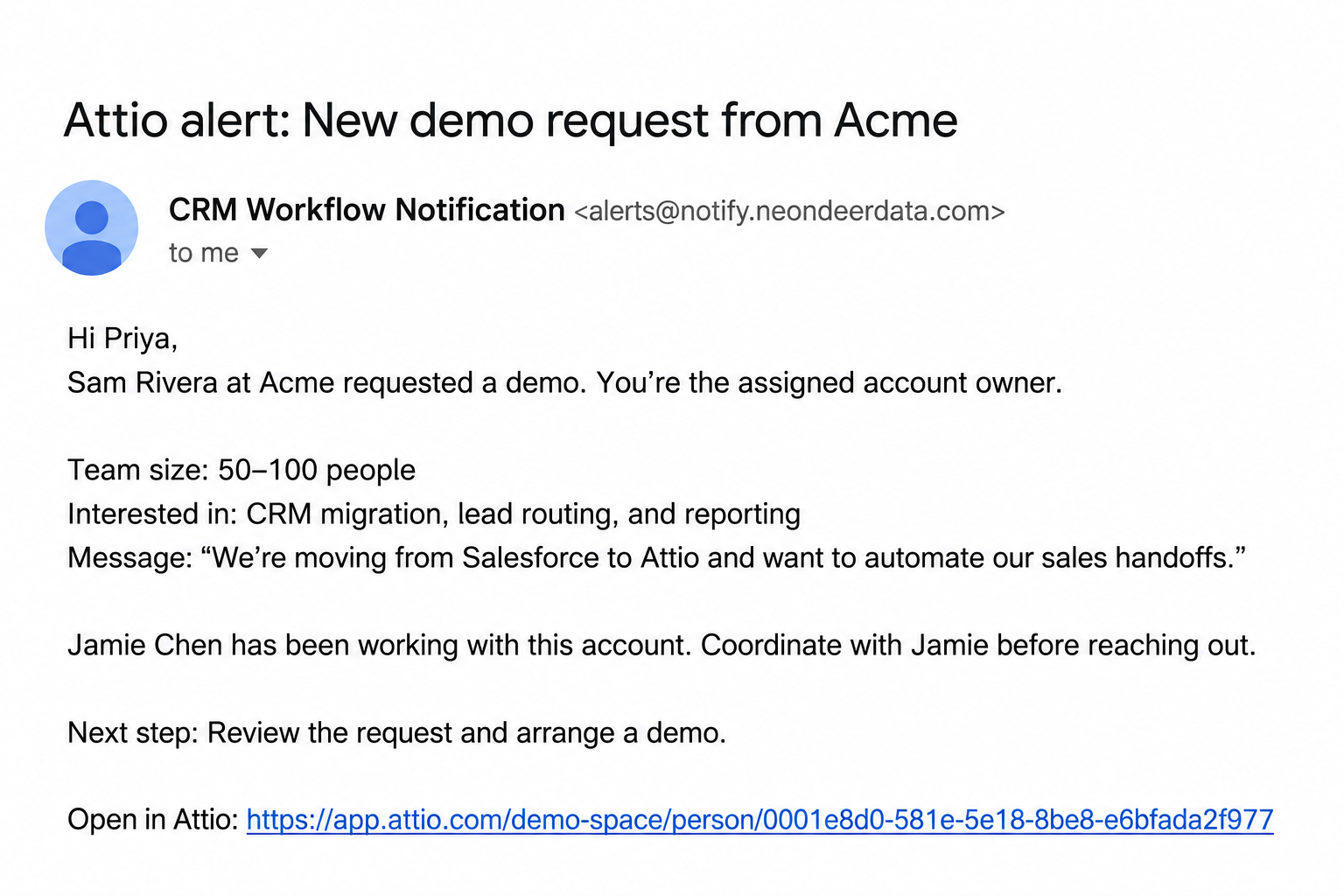
A demo request lands in Attio. Email its assigned owner in Outlook with the company, request details, and record link. They can pick up the lead without watching a Slack channel.
Email Notifications
Send custom internal email alerts from your Attio workflows. Give the deal owner, founder, or sales leader the context to act in their inbox, even when your team uses Teams or does not use Slack.
20 email alerts per month on Free
Internal alerts
A demo request lands in Attio. Email its assigned owner in Outlook with the company, request details, and record link. They can pick up the lead without watching a Slack channel.
Use your workflow’s conditions to flag high-priority signups or pricing requests. Send yourself the context you need to respond, instead of checking the CRM for every new record.
A deal needs pricing review. Email the commercial lead with the account, deal owner, requested terms, and Attio link. Make the next decision clear without expecting them to follow every channel.
How it works
The alert above is an illustrative demo request: the prospect’s message, the assigned owner, and the next action. Use the fields your workflow has available to make the handoff useful before the teammate opens Attio.
Read the request’s assigned owner and pass that Attio workspace member as the recipient. If a lookup supplies the owner’s ID or email, use Automations to find the member before sending.
Add the company and request type to the subject. Include the submitted answers, handoff context, next step, and record link using values from earlier workflow steps.
Add Send email notification and test the workflow. The alert is queued for that active Attio workspace member; you can review its sending status in Neon Deer.
A form submission needs a response. A won deal needs onboarding. A pricing exception needs a decision. Send the responsible teammate a custom internal alert from the workflow handling that event.
Keep external outreach in Attio sequences and use Email Notifications for the internal handoff. Teammates can read alerts in Outlook, Gmail, or another email client without following a Slack channel.
Use Automations to look up the owner or schedule a future follow-up.
Alert on a meaningful handoff, not every edit. Use Attio’s workflow conditions to decide when a teammate needs to act; Neon Deer handles sending and alert activity.
Write a clear subject and a short plain-text message with the details and record link. An organization-wide subject prefix helps teammates recognize your alerts.
Check queued alerts and their sending statuses in Activity. Cancel an alert before sending starts when it is no longer useful, and set sending rates and expiry times.
An organization admin can add one BCC address for copies of every alert. Use a shared mailbox to keep the team’s notifications together.
Install Email Notifications in Attio, connect Neon Deer, and have an organization admin turn on sending. Pick one business event, choose the teammate who needs to act, and test your first alert.
Free includes 20 email alerts per month. Paid includes unlimited monthly email alerts. Compare plans.
Yes. Alerts arrive by email, so a teammate using Outlook and Microsoft Teams can receive them without Slack. This is an email notification app, not a Microsoft Teams integration.
The main recipient must be an active member of your connected Attio workspace, such as the deal owner, founder, or account manager. Choose the member directly or pass an Attio workspace member returned by an earlier step. This app is for internal alerts, not customer email campaigns.
Attio sequences are multi-step email campaigns for outreach. Native task notifications cover task activity. With Neon Deer, you choose a business event in your workflow, the responsible teammate, and the details to include in a custom internal alert.
Use a specific trigger and conditions in Attio, such as a deal entering the stage that needs pricing review or a customer becoming ready for onboarding. Check the responsible owner and include a clear action in the message. Neon Deer sends when your configured workflow reaches the notification step; it does not decide which business events matter for you.
Alerts are plain text with line breaks preserved, sent by CRM Workflow Notification at alerts@notify.neondeerdata.com. You configure the subject and message with values available in the workflow, including an Attio record link. Custom HTML layouts, attachments, and a custom sender address are not available.
Activity shows queued alerts and sending statuses. Sent to email provider means the provider accepted the message; it does not confirm inbox delivery or that someone read it. Open and click tracking are not available. Review alert activity.
An organization admin can set one organization-wide BCC address. It receives copies of every alert across your workflows, and copies do not count as extra alerts. The main recipient still has to be an active Attio workspace member. For an email-only service, test its intake requirements before relying on these copies; there is no service-specific integration.
Built exclusively for Attio. Start with 20 alerts a month on Free, and put the rest of the Neon Deer toolkit to work as your team grows.